See who is at the gate. Understand an alarm alert. Decide who can enter. We plan compatible cameras, alarms, intercoms and access control around the things you need to do every day.
Integration connects compatible systems so they can share selected functions. Each system still has its own job; the connection makes everyday controls easier to use.
01
A visitor arrives
See them. Speak with them. Choose whether to open.
An intercom call can reach a compatible indoor screen or phone. With suitable release hardware and permission, you can then open the relevant door or gate.
Requires compatible answering equipment, a suitable lock or gate interface and the right permissions.
02
An alert needs checking
Check the camera behind the alert.
Use the camera covering the relevant area to help understand what happened. Supported alarm-to-camera links may make that check easier; otherwise, open the relevant camera or recording yourself.
Automatic links need model-specific verification. An alert does not prove footage was saved or that anyone has responded.
03
The household changes
Share access. Keep control.
Use supported account sharing or individual entry credentials for authorised people. Choose the access each person needs and remove old permissions rather than passing around the main administrator login.
App sharing, door credentials and alarm permissions may need to be managed separately.
04
You leave or arrive home
Make routine controls easier to reach.
A compatible screen or app can bring selected functions together. Where supported, an agreed routine can combine useful actions such as changing an arming state or operating a suitable lighting relay.
Automations are checked individually. Unlocking a door does not automatically disarm an alarm; safe exit and manual controls still matter.
02 · Each system has a job
The right pieces. Planned as one system.
You do not need every device to benefit from integration. Start with the functions you need and check which equipment can support them.
Use supported functions from a convenient screen or app. DMSS is Dahua’s customer app; the functions available depend on your devices and account permissions.
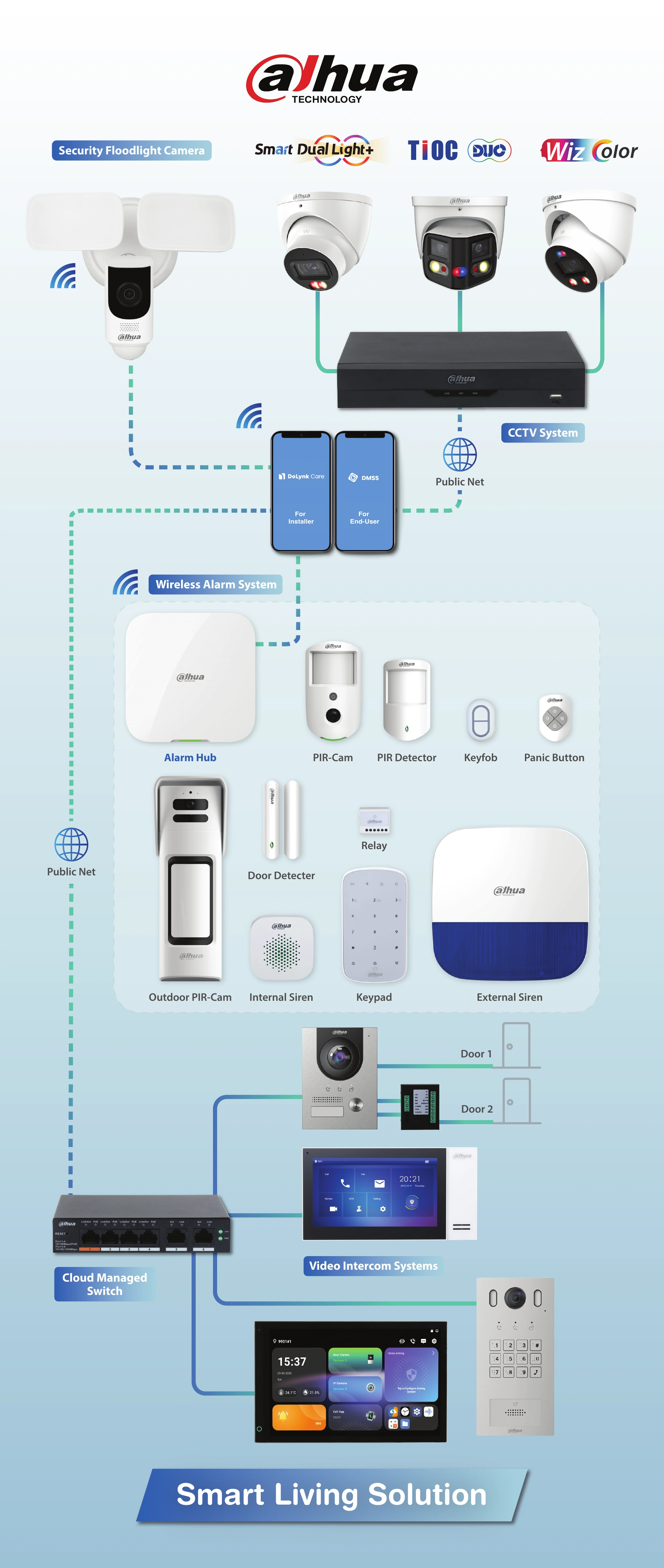
Explore the manufacturer’s system diagramOptional technical example · Dahua Smart Living Solution
Smart Living illustration
One example of a connected setup.
The diagram shows Dahua’s example of a connected setup. It helps explain the possibilities; your home does not need every item pictured. The devices and connections for your installation are confirmed in your quotation.
The network switch connects compatible wired equipment. A router links the local network to the internet. The diagram’s “Public Net” label refers to the internet, not public access to your cameras.
Sharing a brand name is not enough to confirm compatibility. We check the actual models, installed software, connections and functions you want to use.
Camera views, entry controls, alarm functions and apps must support the proposed connection. Some settings and accounts remain separate; one app will not necessarily provide every function.
Power, internet and storage
Remote viewing and phone answering depend on the relevant equipment, power, internet and platform services. Local recording or entry functions may continue without internet only where the design supports it. Backup power and storage requirements are assessed separately.
Door and gate safety
Release hardware must suit the opening and its safe-exit requirements. A relay is an electrically controlled switch; adding one does not, by itself, make a gate or door safe or compatible. Required specialist work is identified in the scope.
Costs and future additions
Any mobile service, cloud subscription or separately agreed support cost is identified before you proceed. You can plan a staged installation, but future compatibility is checked rather than assumed.
04 · Your system. Your permissions.
You stay in control of access.
DMSS is used by the customer. DoLynk Care is an installer service platform shown separately in the diagram. Optional device-health reporting requires an agreed service and your customer-controlled entrustment. It is not routine viewing of your CCTV footage.
Temporary configuration access follows a separate approval process:
We explain the request
You receive both an email and a text with the proposed date, time, purpose and duration.
You agree first
Reply by email or text before we send the app request.
You approve in DMSS
Access begins only after your separate app approval, for the agreed task and period. It stops if you withdraw permission.
Customer notifications and device-health services are not professional alarm monitoring or emergency response. No security system guarantees that every incident will be prevented, detected or recorded.
Our professional scope: security installation, security agent services and security consulting, including smart technology, security integration and structured network and data cabling. Jayke provides general advice, guidance and assistance with preventative cyber security. For specialist cyber security advice, assessment or support, we recommend contacting an IT specialist.
Plan your system. Add when you need to.
Start with what matters most.
Tell us about the entrances, areas and daily tasks you want to manage. We can assess what you already have, identify useful connections and explain a practical installation or upgrade path.
Illustration and technology referencesManufacturer sources and the original diagram
The supplied Dahua Smart Living Solution illustration is reproduced without changing the equipment or connections. It is not a site-specific wiring plan. Manufacturer descriptions explain possible functions; West Protect verifies the proposed equipment and setup for each job.